Adding Your First Seeds
What Are Seeds?
Seeds are the starting points for Guard's discovery engine. You provide the roots — Guard grows your complete asset inventory from there.
A seed can be any of the following:
Domains — e.g.,
example.comIPv4 addresses — e.g.,
192.168.1.1IPv6 addresses — e.g.,
2001:db8::1CIDR ranges — e.g.,
10.0.0.0/24Web applications — e.g.,
https://app.example.comCloud accounts — AWS, Azure, or GCP account identifiers
Repositories — source code repositories for code-level discovery
Every asset Guard discovers traces back to a seed. The more precise your seeds, the more complete your attack surface coverage.
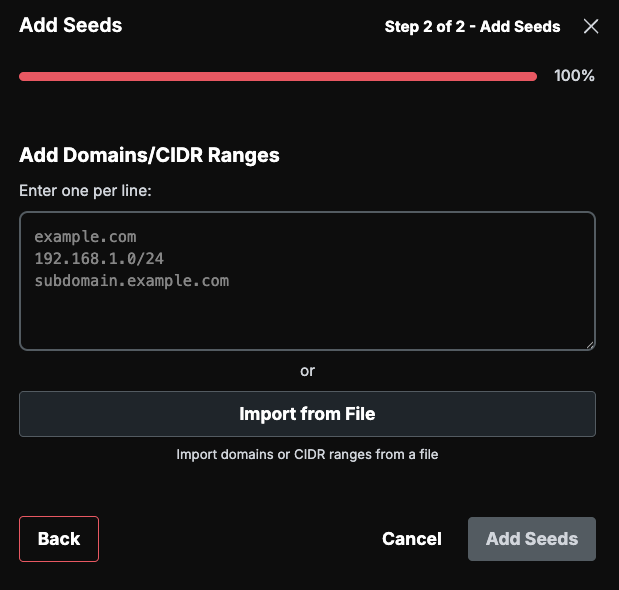
How to Add Seeds — Via the UI
The fastest way to get started is adding seeds directly in the Guard interface.
Navigate to Assets in the left sidebar.
Click Add Seed.
Select the seed type
Enter the seed value (e.g.,
example.comor10.0.0.0/24).Click Add Seeds.
How to Add Seeds — Via File Import
For bulk onboarding, import seeds from a file.
Supported Formats
CSV
TXT
XLSX
XLS
Steps
Navigate to Assets in the left sidebar.
Click Import.
Chose Seed Import.
Drag and drop the supported file type
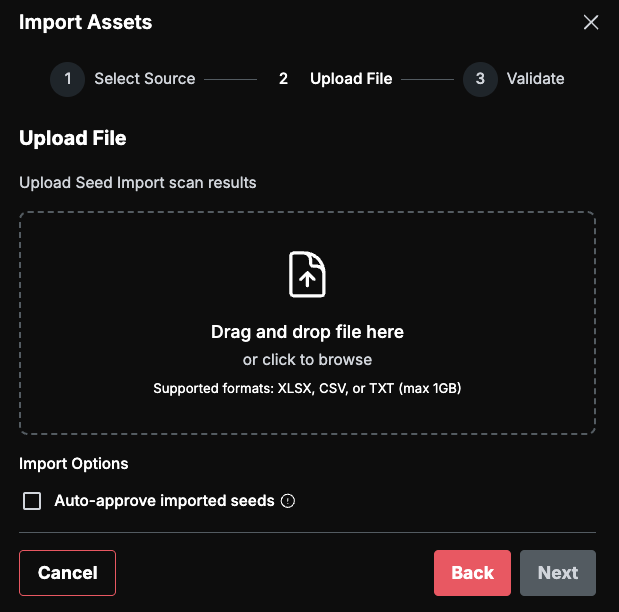
Guard automatically parses domains, IP addresses, and CIDR ranges from the file contents. Unicode normalization and IP range deduplication are handled for you — no manual cleanup required.
How to Add Seeds — Via Integration
Connect your existing tools and cloud accounts to bring in assets automatically.
Cloud Auto-Discovery
Connect an AWS, Azure, or GCP account and Guard will discover assets from your cloud environment. Navigate to Integrations, find your cloud provider, and provide the required credentials.
Third-Party ASM Imports
Guard integrates with external attack surface management tools to import assets they have already identified:
Axonius
CyCognito
Censys
HackerOne
Navigate to Integrations, find your tool, and provide credentials to begin syncing.
What Happens After Seeding
Once seeds are in place, Guard's discovery pipeline expands outward from each one. The following techniques run automatically:
Subdomain enumeration — active and passive discovery of subdomains
DNS resolution — forward and reverse lookups to map infrastructure
WHOIS and reverse WHOIS lookups — identify related organizations and domains
TLS certificate mining — extract Subject Alternative Names (SANs) to find additional hostnames
SEC EDGAR filing analysis — discover subsidiaries and affiliated entities
CSP header mining — identify third-party services and related domains from Content Security Policy headers
Preseeds
As discovery runs, Guard identifies preseeds — potential new assets discovered from your existing ones. Preseeds are not added to your inventory automatically. Instead, you review and approve them to expand your attack surface.
Types of preseeds Guard discovers:
WHOIS company names
EDGAR companies (subsidiaries)
TLS certificates
Favicons
DNS subdomains
CIDR handles
Best Practices
Start with your primary domain(s). Guard will find the rest through its discovery pipeline. You do not need to enumerate every subdomain yourself.
Add cloud accounts early. Cloud auto-discovery provides internal surface coverage that domain-based discovery alone cannot reach.
Review preseeds weekly. New discoveries surface regularly as the internet changes. Staying on top of preseeds ensures your attack surface stays current.
Use integrations to import what other tools already know. If you run Axonius, CyCognito, or another ASM tool, connect it to Guard to avoid duplicate discovery work.