Reporting and Exports
Export vulnerabilities, assets, seeds, and technologies as CSV, JSON, or PDF, or generate a formatted risk report.
Overview
Guard provides multiple ways to extract and share your security data. Vulnerability, asset, seed, and technology exports offer CSV, JSON, and PDF. Vulnerability export also offers Markdown. A separate per-risk PDF export renders markdown, embedded images, and CVSS metrics. For compliance needs, Guard subscriptions include annual penetration test reports generated by Praetorian operators. For programmatic access, the Guard Platform API and Python SDK support automated data extraction.
Exporting data requires the Analyst or Admin role.
Data Exports
Each data section in Guard — Vulnerabilities, Assets, Seeds, and Technologies — includes an Export button that opens an export modal. Select a row first. The modal lets you:
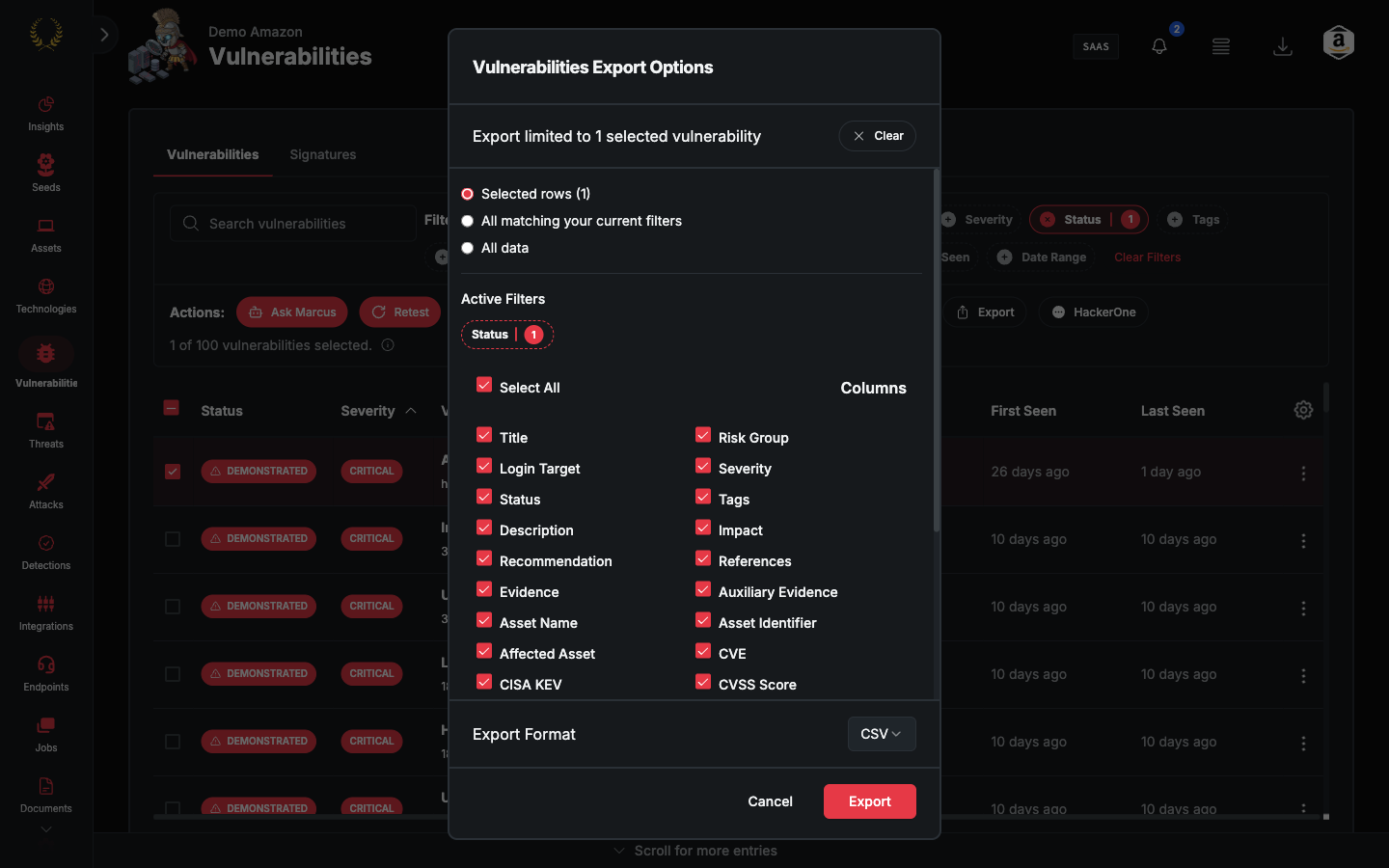
- Select specific columns to include in the export
- Choose the export format (CSV, JSON, or PDF). Vulnerability export also offers Markdown.
- Export either all data matching your current filters, or only selected rows
When you export, the current table filters (search, status, severity, source, and any advanced filters) are automatically applied to the export query. Selected rows take precedence over filters. Filter selections on the export modal are saved between sessions for each export type.
Export Formats
- CSV — Comma-separated values with headers matching the selected column names. Suitable for spreadsheet applications. Assets, seeds, technologies, and vulnerabilities with multiple associations may appear as duplicate rows to reflect underlying relationships.
- JSON — Structured data format that preserves relationships between entities. Suitable for programmatic use and data pipeline integration.
- PDF — A formatted file of the selected rows. Vulnerability export also offers Markdown, a ZIP with one file per finding.
Important Notes
- Duplicate rows — Rows may appear duplicated in exports. This is intentional to represent underlying attributes and relationships. For example, if a single DNS asset resolves to multiple IPs, the
asset_namecolumn will have duplicate entries with correspondingasset_identifiervalues for each IP. This reflects the underlying DNS relationships and aligns with how the Assets and Vulnerabilities pages behave in the platform. - Relationship data — Exports include relationship data between entities. Vulnerabilities include associated assets, technologies include impacted assets, and seeds include their relationships to discovered assets.
- Filtered data — Exports only include data matching selected filters. If no filters are selected, all data is exported according to the choices made on the export modal.
Vulnerability Export
Filter options: Status (Detected, Demonstrated, Resolved, Accepted) and Severity (Critical, High, Medium, Low, Info, Exposure).
Available columns:
Asset Export
Filter options: Status (Approved, Pending, Unavailable, Frozen, Rejected). Deleted is not offered. The other filter is Origins, and its options come from your integrations.
Available columns:
In addition to the export modal, you can also use the Share URLs bulk action on the Assets page to copy shareable links to selected assets to your clipboard.
Seeds Export
Filter options: Status (Approved, Pending, Rejected, Frozen, Dormant) and Class (TLD, Domain, CIDR, IPv4, IPv6). Deleted is not offered. Classification is the Class column. There is no Type column.
Available columns:
Technologies Export
Available columns:
Gap Analysis Export
The Validations page includes a gap analysis view that maps your security coverage against the MITRE ATT&CK framework. The current filtered view can be exported to CSV or JSON format, capturing whatever filters you have applied (status, technique, tactic, etc.). Filtered views can also be bookmarked or shared via URL since filter state is synchronized with the URL.
Per-Risk PDF Exports
Individual risks can be exported as PDF documents directly from the platform. PDF exports include rendered content.
What is included
- Rendered markdown — Headers, lists, bold/italic text, and code blocks in risk descriptions, impact, recommendation, and evidence fields are rendered as formatted content rather than raw markup.
- Embedded images — Images referenced in risk content are embedded inline in the PDF.
- Clickable links — URLs are rendered as hyperlinks.
- CVSS metrics — CVSS score data is included in the exported output.
Threshold behavior
Exports of 50 risks or fewer are rendered with full formatting. Exports that exceed this threshold fall back to a simpler renderer to ensure the export completes successfully on memory-constrained workers. For best results when sharing formatted output, export in batches of 50 or fewer risks.
Generate Report Wizard
The Generate Report wizard produces a structured report from your findings. Open Documents. The Reports section has Generate Report.
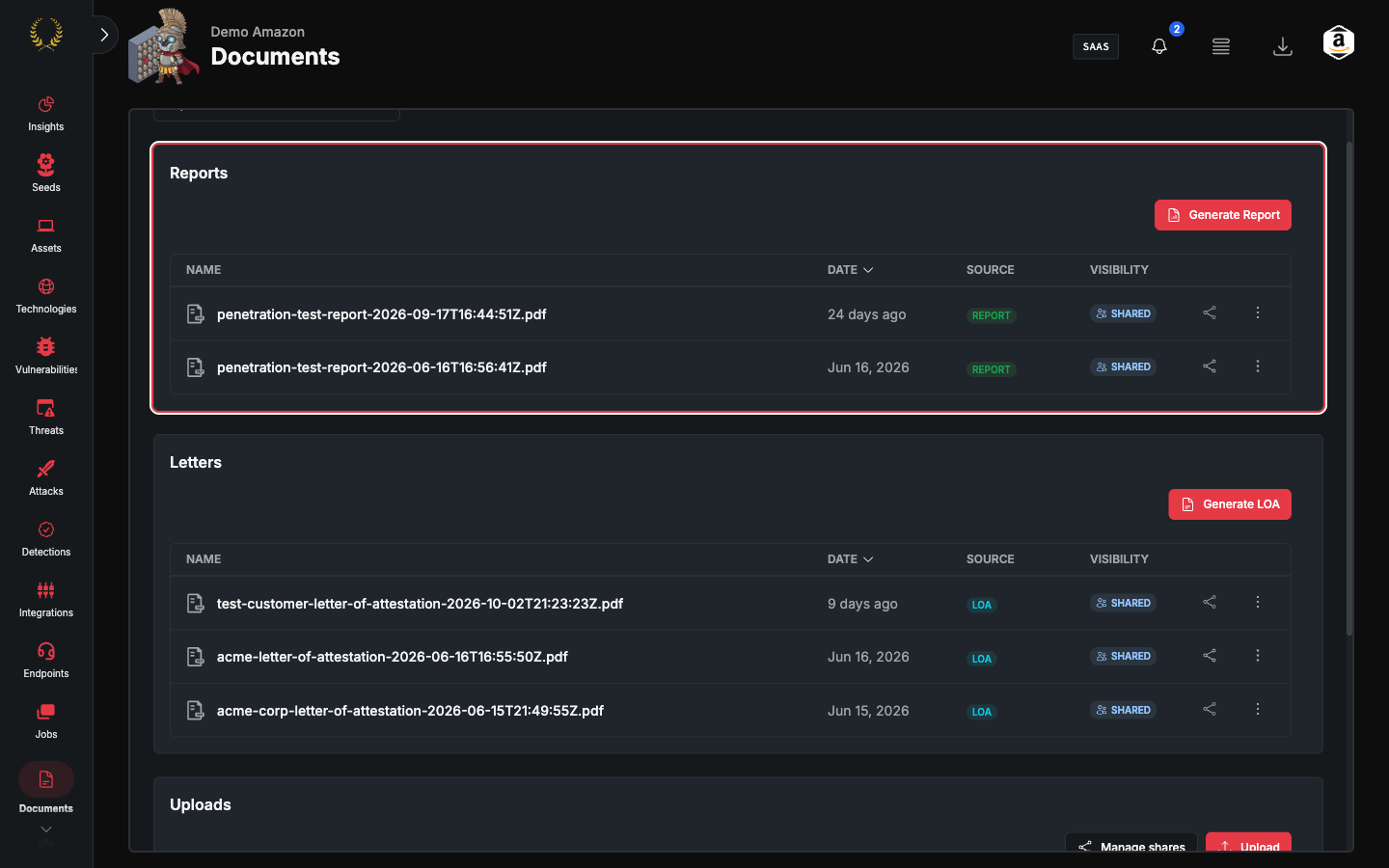
Scoping options
The wizard supports three scoping dimensions in the Specific vulnerabilities step:
- Date range — Restrict the report to findings first seen or last seen within a specified window.
- Asset — Restrict the report to findings associated with one or more specific assets.
- Tag — Restrict the report to findings that match one or more tags.
Scoping by tag
The tag filter lets you produce a report covering a specific workstream, application, or theme without manually selecting individual findings. To use it:
- Navigate to Documents > Reports > Generate Report.
- Proceed to the Specific vulnerabilities step.
- Open the tag filter and select one or more tags.
- The wizard resolves all open risks matching the selected tags automatically.
- Complete the remaining wizard steps and generate the report.
You can combine the tag filter with other scoping options. The resulting export serializes as individual risk keys, consistent with all other report types.
Compliance Penetration Test Reports
Guard subscriptions include an annual penetration test conducted by Praetorian operators. These reports are human-written — not automated scan output — and satisfy compliance requirements for SOC 2, PCI DSS, HIPAA, and other frameworks.
A compliance report includes:
Executive Summary — High-level assessment of your security posture for non-technical stakeholders
Methodology — Description of the testing approach, scope, and tools used
Findings — Grouped by severity or engagement phase, each including:
- Description and business impact
- Proof of exploitation (screenshots, request/response pairs, command output)
- Remediation guidance with prioritized steps
- CVSS score and vector string
Appendices — Supporting data including scan results, asset enumeration details, and raw evidence
Report formats include PDF (for compliance auditors and executive distribution) and DOCX (for internal customization before distribution).
Report generation is managed by your Praetorian team — these reports are not self-service. Findings go through a validation step to ensure proper definitions, severity ratings, and remediation guidance before a report is produced.
API and CLI Access
For programmatic access to your data:
- Guard Platform API — Query and export risks, assets, seeds, and attributes via REST endpoints. See the API Technical User Guide in the documentation for endpoint details and authentication setup.
- Python SDK (
praetorian-cli) — Install viapip install praetorian-cliand use the SDK to script exports and automate data extraction workflows. See the Developer Resources section for code examples and integration patterns.
Best Practices
- Before exporting — Review and adjust filters to get the desired data set. Select only the columns you need to keep exports focused and manageable.
- For large data sets — Use filters to reduce export size and consider exporting in smaller batches if needed. For PDF exports, keep batches at 50 risks or fewer to ensure fully rendered output.
- For relationship analysis — Use JSON format to preserve relationship data. Include all relevant columns and review duplicate rows to understand entity relationships.
- Choose the right format — Use CSV for spreadsheet analysis and stakeholder sharing. Use JSON for programmatic consumption and data pipeline integration. Use PDF exports when sharing individual risk details with external stakeholders or auditors.
- Scoping reports by tag — Use the tag filter in the Generate Report wizard to produce focused reports for a given workstream or application without manually curating individual findings.
Support
If you need assistance with exports, reports, or have questions about the data included in your exports, contact our support team at support@praetorian.com.
Was this helpful?
Still need help? Ask the team